Beta
sillonette
Your music in OBS, without going through a server.
Sillonette is a browser extension and an overlay for OBS. You listen to YouTube Music, OBS shows the title, the artist, the cover and the progress. Everything happens on your PC: no server, no account.
Beta: tried with success on Windows with a real OBS, but not yet during long streams. Keep a backup plan.
Free, MIT licence. The zip is only downloaded from GitHub. Giving feedback needs a GitHub account, and what you write there is public.
How it works
No server between YouTube Music and OBS: everything stays on your PC.
-
The extension reads the song
In your browser, it reads the title, artist, album, cover and position on YouTube Music. Nothing else.
-
It hands it to OBS
Through the WebSocket server built into OBS, on your PC only. It sends a single kind of message: the current song.
-
OBS shows it
The overlay is a file on your PC, loaded in a new OBS "Browser" source. It follows the song within about a second.
What it does
The list is short. On purpose.
- Title, artist, album, cover and progress bar.
- You pause, the overlay shows it. Tab closed: the overlay empties at once.
- YouTube Music ads never show up in the overlay.
- Two tabs playing at the same time: the first one keeps the overlay, the second gets code E10.
- OBS restarted or source reloaded: the overlay catches up by itself within about 5 seconds.
- Customisable, with a preview (made-up tracks or your music, live): colours, font, size, what is shown, animations, behaviour when paused.
- If you like, the card only shows for a few seconds at each new track, then hides.
- Free, no account, no cookie, no ads.
The skins
Six skins, each one wide, compact on a single line or as a vertical card. You pick the skin and the layout in the extension’s window.
- Studio
- Neon
- Vinyl
- Retro
- Arcade
- Lofi
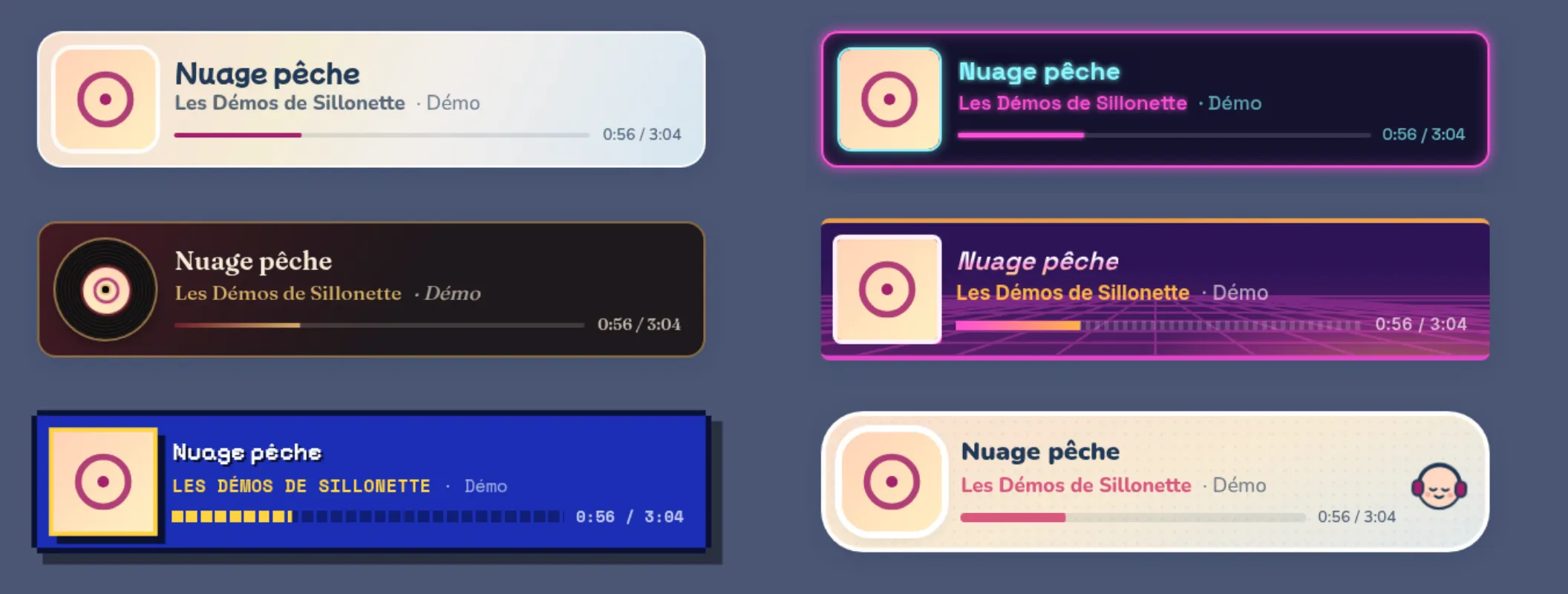
Everything else is set on the extension’s "Customize" page, with a preview: colours, font, size, what is shown, animations, behaviour when paused, language.
The OBS password
To talk to OBS, Sillonette needs the password of the OBS WebSocket server. This password gives full control of OBS: switching scenes, starting or stopping the stream, reading or changing your stream key. OBS cannot create a more limited one.
- Sillonette only connects to OBS on your PC and only sends the current song. The password itself never travels: only a proof computed from it goes to OBS.
- It is kept in the browser, unencrypted, just as OBS keeps it in its own settings. You can choose not to keep it after the browser closes, or forget it with one click.
- The OBS WebSocket server also listens on your local network, unencrypted and with no limit on attempts. Keep the long password generated by OBS.
- These limits come from OBS: Sillonette cannot fix them.
Never show this password on stream.
If it leaked: in OBS, generate a new password (Tools, then WebSocket Server Settings), then paste it again into Sillonette.
Privacy
- No server, no account, no cookie, no statistics: the extension only talks to OBS, on your PC.
- It only reads the current song on music.youtube.com: title, artist, album, cover address, duration and position.
- Covers come straight from Google’s image servers, as on YouTube Music: Google therefore sees your PC’s IP address.
- OBS passes the song to all its "Browser" sources: another source (alerts, chat) can see it too.
Questions
Can I try it?
Yes. The zip is a free download on GitHub, and the installation guide explains every step. It is a beta: keep a backup plan for your streams.
Does it work on Windows?
Yes: I tried it with success on Windows, with a real OBS. The automated tests run on Linux. Not tested yet: long sessions, several hours of streaming.
Which browsers?
Chrome, Edge and Opera, by loading the extension in developer mode. The automated tests run with Chromium. Firefox only works as a temporary add-on, to load again each time it opens: for the curious.
Which OBS version?
OBS 28 or newer: the WebSocket server and the "Browser" source are built in. Tried with OBS 33.
Does it update by itself?
No. For a new version, unzip the new zip into the same folder, then reload the extension. The installation guide shows how.
Can it show only for a few seconds?
Yes: on the "Customize" page, choose "A few seconds at each new track", then the duration. The card shows when the track changes, then hides until the next one. It does not come back when you resume after a pause. An error code still stays visible.
Must my OBS source have the recommended size?
It is the safest: the extension’s window and the "Customize" page show it. If the source is narrower, the card shrinks to fit the width, and long titles get less room. If it is bigger, the card keeps its size. Height does not adapt: a source too short cuts off the bottom of the card.
Does it work with Spotify?
No. For now, it is YouTube Music and nothing else.
What does E10 mean?
A small badge at the bottom of the overlay tells you what is wrong. It goes away by itself once things are fine. On the "Customize" page, you can choose not to show it on stream.
- E10
- Another YouTube Music tab is already playing: the first one keeps the overlay. Pause or close the other one.
Can I use it in a monetised stream?
Yes, Sillonette is free and you can show the overlay in all your streams, monetised or not.
But showing the title gives no right to the music: Sillonette plays no sound. Streaming copyrighted music can get you muted, claimed or a copyright strike. Following the rules of YouTube Music and of your platform is up to you.
How do I give feedback or report a bug?
On GitHub, with the "Give feedback or report a bug" link (a GitHub account is needed). Everything you write there is public: never put your OBS password, your stream key or personal information in it.
Is it linked to YouTube or OBS?
No. Sillonette is an independent project, neither affiliated with nor endorsed by YouTube, Google or the OBS Project. YouTube Music is a trademark of Google LLC.
Where the project stands
No dates. I would rather keep my promises.
-
Today
A beta, released on GitHub: the extension, the overlay, the six skins and the customisation page. Tried with a real OBS, on Windows and on Linux, and checked by automated tests.
-
Before a stable version
Trials during long streams, several hours in a row.
-
Later, maybe
The extension stores, for automatic updates. Other music platforms.